Get Started
Simplest way to run
- Prepare the INPUT file and the input file for first principlec code
- Enter the folder
- Simply run
elastic3rd run
Inputs
The inputs for Elastic3rd can be divided into two parts. The first one is the INPUT file, and the second is the input files for first princples code.
INPUT
| Parameters | Default | Comments |
|---|---|---|
| BaseName | Si |
|
| CrystalType | Cubic1 |
|
| Ord | 3 | The order of elastic constants |
| EnergyCode | CASTEP | The first principles code, currently support CASTEP and VASP |
| EnergyRun | 1 |
|
| MaxStrain | 5 | The maximum strain, in unit of %. e.g. 5 means the strain range is -5% to 5% |
| STEPS | 5 | The number of points in each strain mode |
| NP | 1 | The number of cores used in the first principles codes |
First principles inputs
- CASTEP For CASTEP, two files are required for calculating, BaseName.cell and BaseName.param. For details, ref. CASTEP files .
- VASP To run VASP, four files are required: INCAR, POSCAR, KPOINTS and POTCAR. For details, ref. VASP files .
Calculation
Using CASTEP or VASP
Currently, Elastic3rd support CASTEP and VASP to calculate the energy or stress. Hence, the user can call vasp or castep by setting the INPUT file.
Note: The CASTEP is tested using the CASTEP module in Materials Studio. By default, the user should provide RunCASTEP.bat (windows) or RunCASTEP.sh (linux) in current folder. Usually, this file loacted in Materials_Studio_ install_pathetcCASTEPbin
For VASP, it runs vasp by mpirun -np NP vasp_std. So, please ensure that mpirun and vasp_std can be found in yout PATH.
Using other first principles code
If the user want to use other first principles code to calculate the energy of stress, the user only need to prepare the following thing:
write a python file named with the code’s name(e.g. qe.py, lower required) under elastic3rd/energy/
In this file, the user need to write the following functions
- get_base_vec(BaseName): this function get the lattice vector from the code’s input file
- write_base_vec(BaseName, BaseVec): this function write out the lattice vector to the code’s input file
- run(NP, BaseName): this function return the string to run the code
- get_energy(BaseName): this function get the energy from the code’s output file
- copy_files(BaseName, Path): this function copy the required files of the code
Then in the INPUT file, the file can call the code by specify “EnergyCode QE”
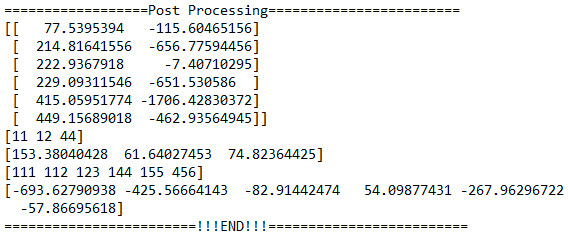
Post
The SOECs and TOECs (only taking second and third order effect into consideration) are printed in the log file on the screen.
If the author want to taken higher-order effect into consideration, the user can run elastic3rd post command in the folder where the job submitted or use Elastic3rdPost.py script in the example folder
For elastic3rd post command, please use -h for detail help.
For test, the user can run elastic3rd post in the example/Si/CASTEP folder directly.
Outputs
The structure of outputs
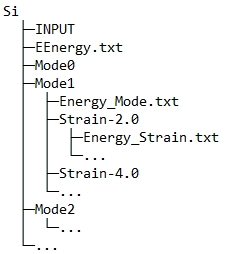
All the output are stored in the folder named BaseName, of which the value is set in INPUT file. The following is the structure of the results.
Output files
This section gives an explanation for each file generated by Elastic3rd.
| File name | Comments |
|---|---|
| INPUT | A backup of INPUT file |
| EEnergy.txt | The energy of each strain mode(each column) and each strain(each row) |
| Energy_Strain.txt | The energy of single strain, in which there are several values in different unit |
| Energy_Mode.txt | The eneargy of single strain mode. In unit of eV |
| Folders | Comments |
|---|---|
| Mode0 | This folder contains the result of undeformed structure |
| ModeN | This folder contains the result of differen strain modes |
| StrainN | This folder contains the result of different strains |
Note: here N is integer and N>0
Log file
By default, the log file is not saved, but print in the screen. And it can be saved by re-direction.
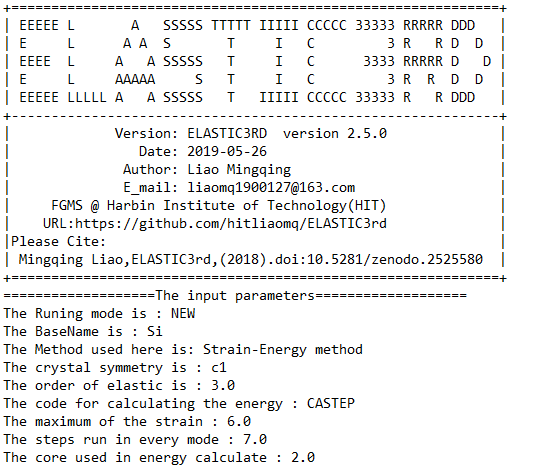
It can be divided into four parts
- Part1: the logo part
- Part2: the result of intial structure
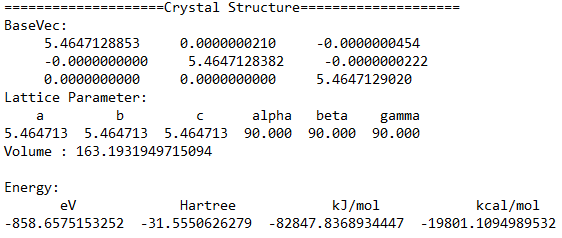
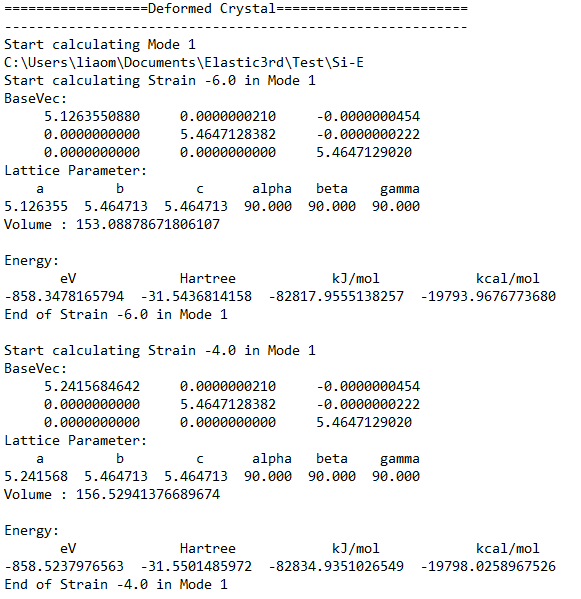
- Part3: the result of different strains and strain modes
- Part4: the post process part